How to fix terminal processing errors on Linux Ubuntu

Contents
After the release — and therefore the upgrade of our systems to Ubuntu 16.04 — you may run into some errors when trying to install packages from the terminal using the bash command:
sudo apt-get install nome_pacchettoThe error message
In my specific case I was trying to install git and got this error message:
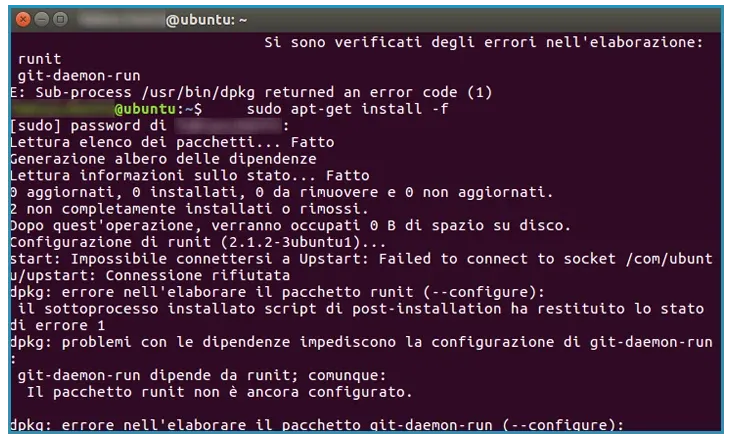
Another common, very similar error is the following:
Lettura elenco dei pacchetti... Fatto Generazione albero delle dipendenze Lettura informazioni sullo stato... Fatto build-essential is already the newest version (12.1ubuntu2). 0 aggiornati, 0 installati, 0 da rimuovere e 55 non aggiornati. 2 non completamente installati o rimossi. Dopo quest'operazione, verranno occupati 0 B di spazio su disco. Continuare? [S/n] S Configurazione di runit (2.1.2-3ubuntu1)... start: Impossibile connettersi a Upstart: Failed to connect to socket /com/ubuntu/upstart: Connessione rifiutata dpkg: errore nell'elaborare il pacchetto runit (--configure): il sottoprocesso installato script di post-installation ha restituito lo stato di errore 1 dpkg: problemi con le dipendenze impediscono la configurazione di git-daemon-run: git-daemon-run dipende da runit; comunque: Il pacchetto runit non è ancora configurato. dpkg: errore nell'elaborare il pacchetto git-daemon-run (--configure): problemi con le dipendenze - lasciato non configurato Segnalazione apport non scritta poiché il messaggio di errore indica la presenza di un fallimento precedente. Si sono verificati degli errori nell'elaborazione: runit git-daemon-run E: Sub-process /usr/bin/dpkg returned an error code (1)How to fix it
Fortunately, fixing the problem is quick and easy. Just run, in order, the following commands, remembering to replace git with the name of the package you are getting the error with.
sudo apt-get purge runitsudo apt-get purge git-allsudo apt-get purge gitsudo apt-get autoremovesudo apt updatesudo apt install gitWhy it works
This unblocks the terminal and lets you finish the installation procedure correctly. Then run the install command that was giving the error again. ????
Frequently asked questions
What does "Sub-process /usr/bin/dpkg returned an error code (1)" mean?
That dpkg failed to finish configuring a package and left it halfway. As long as that package stays in that state, apt refuses to install anything else: that is why the error seems to be about the program you were installing, while the cause is another package left hanging.
Does this procedure also work on newer Ubuntu versions or on Debian?
The mechanism does: find the package left halfway, remove it with purge, clean up with autoremove and reinstall. What changes is the name of the culprit package, which in my case was runit. The specific Upstart-related case is rare on modern versions, which use systemd.
Do I risk losing data with purge?
purge removes the package and its system configuration files, not your documents. Care is needed with packages that hold configurations you rely on — a database, a web server — because there the configuration is your own work. For a package like git there is nothing to lose.