How to remove WhatsApp's blue ticks on iPhone

Contents
WhatsApp, undoubtedly the most popular messaging app for smartphones, often sparks debate over privacy.
In fact, just a few months ago the read receipt notification was introduced. Every time you read a message, the sender sees the two blue ticks next to it, meaning that not only did we receive the message, we also opened it.
Users didn’t take this feature well; unfortunately, the classic excuses like “sorry I didn’t reply, I never got it” or “I hadn’t read it” don’t hold up anymore.
On Android it had already been possible to turn this option off for a while, but for some strange reason not on iOS. I personally contacted the WhatsApp support team to ask about it, and they had no qualms replying « Turning off this feature is only available on certain platforms at this time. We cannot speak for future developments for other platforms, but we appreciate your feedback ».
Translated into plain English, that means « tough luck ».
But things have finally changed, and from today even iPhone owners can disable this frustrating blue double-tick setting.
So let’s see right away how to easily remove the WhatsApp blue tick on iPhone.
1. Update WhatsApp to the latest version
Since this feature was introduced with version 2.12.1, you need to make sure the app is up to date. In the App Store app, go to the Updates section and check that WhatsApp is not in the list of apps to update.
If it’s there, tap the Update button.
2. Change the settings
Once you’ve opened WhatsApp, go to Settings > Account > Privacy. You should see a screen like this:
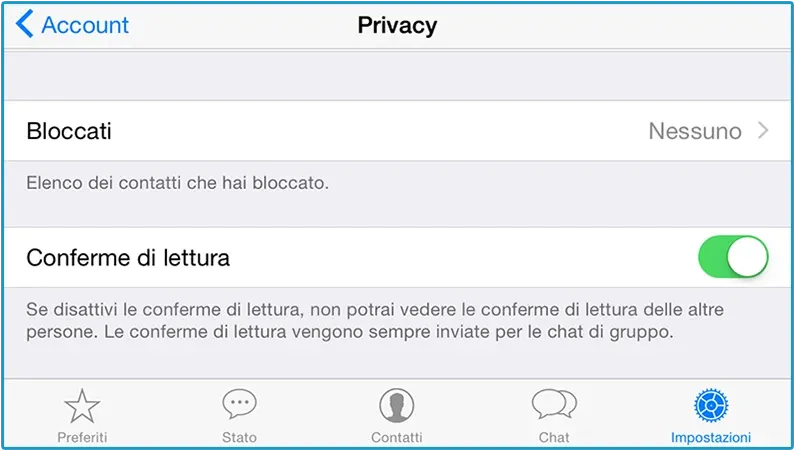
Then turn off the Read Receipts option.
Done!
3. Consequences
OK, we made it, but by disabling this feature you need to remember that:
-
It’s not a one-way street. By removing read receipts, others won’t know whether we’ve read their message or not, but we won’t know either when it comes to them.
-
It doesn’t work in groups. This change only takes effect in private chats, the ones with a single person; in groups, the other members will still be able to check whether we’ve read the message or not.
-
It doesn’t work with voice messages. Exactly, since voice messages aren’t read but — of course — listened to, the other person can see whether we’ve listened to the voice message or not. As soon as we tap the little Play arrow to listen to it, the microphone symbol turns blue; which is the equivalent of the double tick. If, after reading the consequences, you think it’s not worth it or you don’t accept these trade-offs, it’s better to leave read receipts enabled, as they are by default.
Frequently asked questions
Does this procedure still work today?
Yes, the option still exists and it lives in WhatsApp's privacy settings, even though the exact path has changed a few times over the years with the app redesigns. What hasn't changed is how it works: it's a single switch for read receipts.
If I turn it off, do I stop seeing other people's blue ticks too?
Yes, and that's the part that surprises people the most: the trade is symmetric. The moment others can no longer tell whether you've read their messages, you can no longer tell whether they've read yours. There's no way to keep only the upside.
Does it work in groups and with voice messages?
No to both. In groups read receipts stay visible to the other members, and for voice messages the microphone icon turns blue when you listen to them, which is the equivalent of the double tick. The setting only affects private chats, on messages you read.